Login
Register
Print
Home >
How to Print Information Pages from M6800/M7200 Series Printer?
File Number:FAQ51M-30V124
How to Print Information Pages from M6800/M7200 Series Printer?
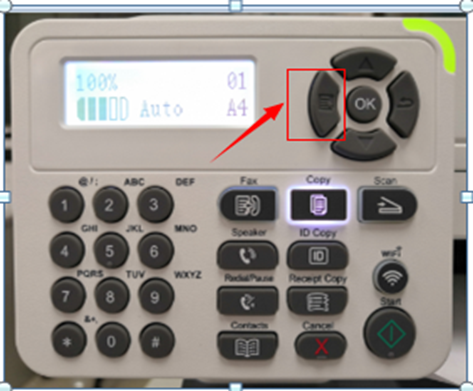
Step1: Click menu and to choose number by ‘page down’ on the below control panel.
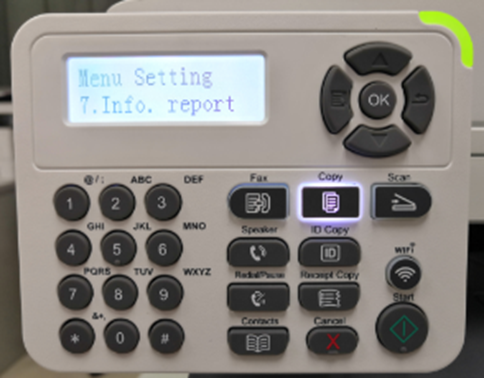
Step2: Click “7-Info.report” in the menu setting---“ok”.
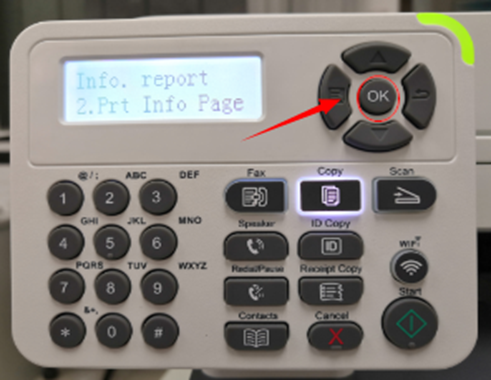
Step3: Select NO.2-‘Prt Info Page’ ---then chose ‘OK” it will be done.
Previous:
How to Print Information Pages from M6700/M7100 Series Printer?
Next:
How to merge multi-page scanned documents into one PDF from M6700/M7100 Series Printer?
Is this page helpful for you?
Yes
No

 Print
Print
 Home >
How to Print Information Pages from M6800/M7200 Series Printer?
Home >
How to Print Information Pages from M6800/M7200 Series Printer?