
 Print
Print
 Home >
Is it possible to close the ‘Auto sleeping time’ on M6500/M6550 Series Printer?
Home >
Is it possible to close the ‘Auto sleeping time’ on M6500/M6550 Series Printer?
File Number:FAQ20M-12V119
Is it possible to close the ‘Auto sleeping time’ on M6500/M6550 Series Printer?
We cannot close it completely. But we can change the sleeping mode from 1min to 60 minus. Please check with below picture: Menu-- System Settings-- Sleep Time Setting—select the time you needed
For M6500/M6550 Series Printer:
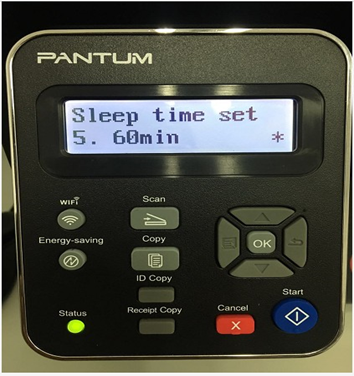
Note: When the printer is in dormant status, you can wake it up just by pressing any button or sending print task.



