Login
Register
Print
Home >
How do I replace or insert a cartridge from M7300 Series Printer?
File Number:FAQ51M-50V124
How do I replace or insert a cartridge from M7300 Series Printer?
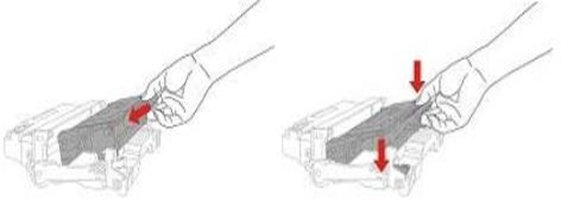
Firstly, pull out the seal on the new toner cartridge and gently shake it for 5 – 6 times, then insert the toner cartridge into the drum unit.
Last, install the assembly into the printer until hearing a “click” sound.
Previous:
How to print wirelessly with Mac WIFI Direct via M7300 Series Printer?
Next:
How do I check the amount of toner left in my cartridge from M7300 Series Printer?
Is this page helpful for you?
Yes
No

 Print
Print
 Home >
How do I replace or insert a cartridge from M7300 Series Printer?
Home >
How do I replace or insert a cartridge from M7300 Series Printer?